Showing posts with label Tools. Show all posts

Friday, January 7, 2022

Self-Motivation Quiz for Teens

TruSpark Curriculum and Assessment

The following post is in collaboration with TruSpark. All thoughts and opinions are my own.

With the arrival of a new year comes the excitement of new tools to use with my children in our homeschool journey. As a parent of two very different teens, I'm always on the lookout for resources that help me motivate them with their school work. Today's review is a fantastic tool for parents (and teens!) who are looking for ways to better understand what it is that motivates their teens and what careers might be a great fit as a result. 

Quick Overview

Program: TruSpark
Religious Perspective: Secular
Format: Online/Self-Paced
Grades: 7th and higher
Price: $59.95 and up
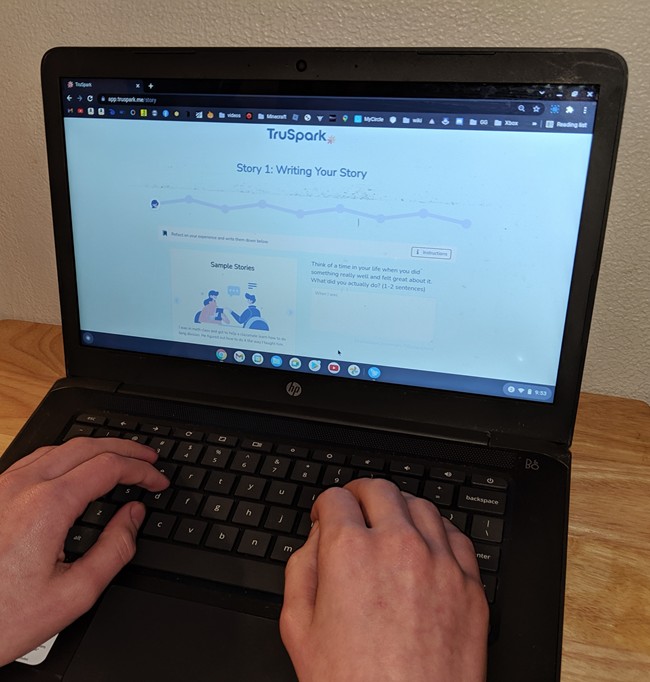
TruSpark Curriculum and Assessment

I think that as parents, we believe we know our kids really well - maybe even better than they know themselves. And often we do. But there are definitely moments when I feel like I have aliens living in my house because they are just so different from me in some ways.

And there are days when I feel like I just can't figure out HOW to motivate them to get something done.

I was curious to see if TruSpark would really help me learn something new about my kids.

**NOTE** I'm sharing the results of my own assessment because my kids have a right to privacy. :) 
 

Core Motivations
TruSpark is NOT a personality test, nor does it tell us what our strengths or talents are. It focuses on discovering and sharing core motivations. They do it by relying on US to share information in a story-based way. 

Don't worry. You don't have to write a lot. In fact, I was really surprised at how quick it was able to figure out my core motivations based on just two or three sentences. 

Core motivation is the stuff inside us that influences everything we do. It's what guides our daily actions and influences our interests. These core motivations are why I started homeschooling... and then decided to start this blog to share the resources and experiences we had.

When researching the site, I found that this curriculum is based on science (yay!) and you can visit their site to read more about the 19 motivations.

TruSpark Curriculum & Assessment

TruSpark Assessment & Curriculum


TruSpark is a simple curriculum and assessment quiz that is designed to help you understand what your core motivations are. 

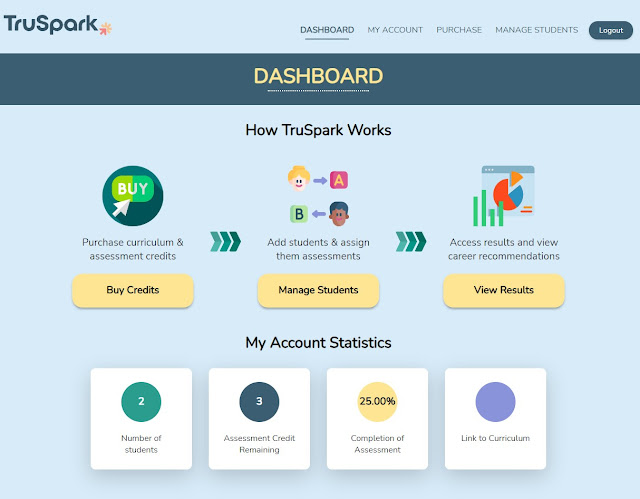
When you purchase a credit from TruSpark you get instant access to a curriculum and assessment quiz. As the parent and/or teacher, you get an account with a dashboard that lets you add students and assign the assessment. 

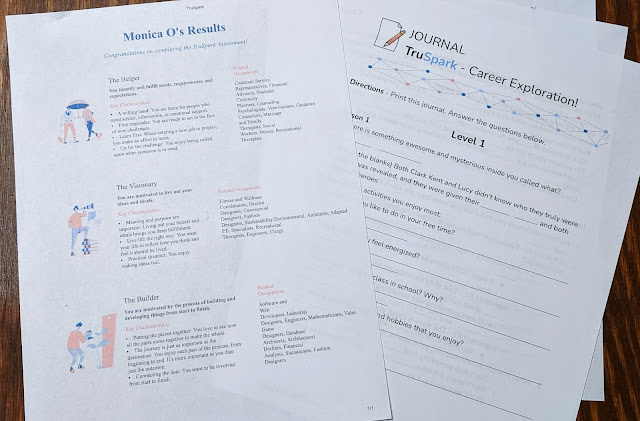
From your dashboard you can also open the curriculum, which is pretty straight forward. It is a series of PowerPoint type slides intended to be used in conjunction with the assessment. There are three levels to the curriculum:
  1. Core Motivations (3 lessons)
  2. Career Exploration (3 lessons)
  3. Live Your Purpose (1 lesson)

I actually did the assessment quiz myself first and then opened the curriculum. I'm glad I did as I then realized that the curriculum should be opened first and that it will guide the student through explanations and a link to the assessment at the appropriate time. This just helps the person taking the quiz better understand what exactly core motivations are, why they are important, and how to use the information going forward.

My oldest son struggles with dysgraphia, so at first he was concerned about the assessments "story-based" approach. He thought he'd have to write a lot. He was so relieved when it turned out he only had to write one or two sentences!

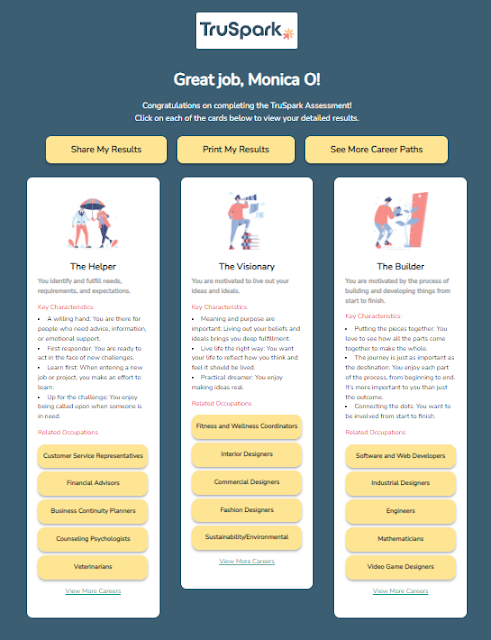
Once you complete the assessment (which only takes a few minutes), my results came in the form of three motivations with a short description and a list of key characteristics. This is the first time a type of personality quiz has been so accurate.

Even my son was surprised by the results. And one of the suggested careers under two of his motivations turned out to be a pilot - which he is currently studying to be!


TruSpark Curriculum and Assessment


Promotes Self-Awareness


I found this whole quiz fascinating. Because once I read the results, I knew they were spot on. But I guess I just didn't consciously realize what it is that motivates me? And I think that knowing this is really critical for my kids. Because then they can make better decisions. 

Understanding yourself is really hard for a lot of kids. And self-awareness, I think, can take a lot of the anxiety out of a teens life. Knowing why you made a choice - or better yet - making a choice knowing how you will likely react/interact with it in the future is extremely valuable.


Career Exploration

The other part that I really like about this program is that after you take the assessment, it provides a list of suggested careers that you may enjoy. And these actually make sense. We've tried personality tests and other quizzes that list careers that would be a good fit. Some of them were WAY off! (But they gave us a good laugh.)

We like that TruSpark doesn't overwhelm you with professions. It gives a short list of the top 10 careers that might complement your child's core motivations based on the results of the assessment. 


The Giveaway!


How fabulous is this? They're giving away a curriculum and 2 (TWO!) assessments to 2 winners! 


But if you've already made up your mind that this is a resource that you'd like to offer your teen, then go ahead and visit their website to sign up!

Want to find this review again? Pin it!

TruSpark Curriculum and Assessment


Thursday, November 19, 2020

Holiday Gifting: FluidStance's Slope


This is a sponsored post in collaboration with FluidStance. All thoughts and opinions are my own.

Today's Holiday Gift recommendation is for those of you with older children who are learning at home. One of the issues that my 14yo has struggled with has been having enough desk space when it comes to online classes. Especially, if he needs to take notes or work out math problems. 

Since they were old enough to start solving complex math equations, my kids have always tried to use a small dry-erase board for math work. But if you homeschool, you know how that sometimes goes because that dry-erase board gets used for a lot of stuff and sometimes it just disappears right when your kid needs it. So then we resort to good old pen and paper, which I usually feel guilty about because all we do is throw it out when they're done. 

So a while ago, I was contacted by FluidStance and I was intrigued to learn more about the Slope. So they sent me one, and - wow! - I love it for my kids!

The Slope is a personal desktop whiteboard. It's PERFECT for students who are using desktops at home. It's made of 100% heavy-duty steel (perfect for magnets, but don't use magnets near your computer!) and is powder-coated using a low-emissions method. The gentle angle (slope!) is great for taking notes using any dry-erase marker and it even has a groove at the top to hold your writing utensil. It also has a phone dock with a hole that allows your charger to plug into your phone, so you can charge it while you're working, OR so your kid can watch a video/zoom class on their phone while typing notes/writing assignments on the desktop. And it won't scratch your desktop because it has felt bumpers on each end to protect the surface underneath it.  

Here's a shot of my 14yo using it for solving Algebra 1 math equations:
(P.S. - Shout out to Teaching Textbooks, our favorite online math program!)

My 16yo wants her own to work out her Analysis math equations on it up in her room. 

Seriously, it is a math and science student's best friend. And I will admit that I've been secretly craving it for myself because I often jot down numbers and notes while working. 

It costs $59, which is a little pricey, but totally worth it because it will last forever! 

So if you're looking for something unique to give your older children this coming holiday season, consider the Slope! Find it here on FluidStance's website.

Disclosure: This is a sponsored post. I received a Slope for review purposes. However, I only agree to promote items that I know will be of interest or use to other parents. All thoughts and opinions are my own.

Saturday, February 17, 2018

CLEP Study Guides for High School Students


(This is a sponsored post in collaboration with Study.com. All thoughts and opinions are my own.)

Did you know that your high schooler can take a test that would count as college credit if he or she passed? Did you know that a great way to save money when sending your kid to college is to go ahead and have them earn college credits so that they don't have to retake basic classes in math, history, literature, foreign language, and more?

Two ways to do this is by taking AP or CLEP exams. You may be familiar with the AP program since many high schools offer Advanced Placement (AP) classes. At the end of the school year, students can take the 3-hour test in May.

But there's also the College Level Exam Program (CLEP), which are generally considered to be a better fit for self-motivated students with strong study skills, as they will need to prepare for the material on their own. Unlike the AP Exam, CLEP is offered year-round. This means that students may take as long as they need to master their chosen field or skill set. And for these reasons, I highly recommend them for homeschool students.

CLEP Study Guides


Today's post is for all of my readers with children in (or going into) high school. I frequently get questions about preparing high school students for college. So when Study.com approached me about sharing their CLEP Study Guides, I agreed to take a look and see if it is a good fit for MommyMaestra readers...and it definitely is!

You may or may not know that CLEP exams are prior learning assessments offered by The College Board that allow students to earn real college credit just by passing a test. Study.com's product includes comprehensive study guides and practice tests to help students prepare for these exams, earn that credit, and save money on their college education.

(Please note that College-Level Examination Program (CLEP) is a registered trademark of the College Entrance Examination Board, which is not affiliated with Study.com!)

At the time of this post, Study.com has 31 CLEP Study Guides covering Business, Composition & Literature, Foreign Language, History & Social Studies, and Science & Mathematics. There are thousands of prep questions, more than 3,000 prep video lessons, and help available 24 hours a day, 7 days a week.

So let's take a look at the actual courses. Just for haha's I selected Spanish because I figured that would interest many of you.

There are three tabs for each course:
  1. Overview
  2. Syllabus
  3. Exams
The Overview section gives you a course summary and lists the actual chapters for the entire course. Each chapter contains a certain number of lessons (the number of lessons varies according to the chapter topic).


What I like best on this page, though, is the Course Progress bar that shows you how much you've accomplished and how much you have left to go. And to pick up where you left off, you can just click on the video next to the bar to resume your lessons in order.


The Syllabus section not only tells you about the course but also about the actual CLEP exam, and how you can register to take it.

And finally, under the Exams tab, you'll find practice tests for each chapter of the course, as well as a study guide and test prep for the actual CLEP. For example, in the Spanish course, there are 34 chapters that you cover, and therefore, 34 practice tests that you can take.


Once you finish, you will also receive a certificate that proves you completed the course.

One of Study.com's company goals is to help students earn the most credit possible, and their CLEP product is a great avenue to help them further that goal by helping students pass their CLEP exams so they can earn transferable college credit at a fraction of the time and a fraction of the cost compared with taking a course at a traditional college or university.

As far as pricing goes, it appears that there are three subscription levels. Take a look:


You can try it out yourself with their five-day free trial. And I do encourage you to try it. But be sure to cancel your subscription if you decide it's not for you or your child.

As a homeschooler, I really like the fact that the courses are self-paced. So my kids can move as slowly or as quickly as they'd like. If my daughter has time to do 6 lessons one day, but only time to watch one lesson video the next, then it's not a problem.

My oldest child will be starting high school next year. Before we moved back to Texas, we had planned to enroll her in early college so that she would have already completed two years of college by the time she finished high school. Now that we've moved away from that opportunity, I'm exploring other options to help us get those courses completed and out of the way so that a) we can save money when it is time for her to go to college, and b) allow her to focus primarily on the courses that interest her once she gets there. Taking the CLEP tests is one way we can do that and using Study.com's CLEP Study Guides is definitely worth the time and money.

On a side note, I happened to notice that Study.com isn't just about CLEP and college prep. While looking through their courses, I found that they offered lessons for K - 12, College, and Graduate & Post Grad. I'm looking forward to exploring this more with my 6th grader. :)

Tuesday, March 1, 2016

Kiddle: New Google-Style Search Engine for Kids


When my son was only five or six years old, he accidentally stumbled on a completely inappropriate YouTube video when he was searching for "Store Wars", a Star Wars parody video we'd watched as a family.

That one incident led to a lot of effort on my part to protect my kids from dangers online. I removed the browser access from the iPad, switched all the computers over to Chrome and logged them in using my name with the safe search settings locked on. But despite this safe search option, there are still things that slip through. The reality is my kids often need access to the search engines in order to research and complete school projects.

You can only imagine my delight at learning yesterday that a new company has launched a visual search engine for kids that is carefully curated by editors and safe search. Children can use Kiddle to search the web, images, videos, and news in a safe manner. When a child enters keywords into the search bar, the first three links in the lists go to sites written specifically for kids and hand-picked by the editors, who also select the next 3 or 4 links to web pages with simplified text that children can understand. And then the rest of the links are to more complex sites that are curated by safe search.

And the videos to which the site links are safe, too. Most of the ones I found went directly to SprogTube.

So yes, you could do a search on Miley Cyrus without having her twerking video coming up in the results. In fact, I tried typing various things myself into the search bar and was pleased to see that it redirects kids with a gentle admonition:


Phew!

One of my current stresses is Minecraft. My kids constantly want to look up videos or instructions for it. I agonize over letting them watch the instructional videos and try to always be around when they do in case there is something I don't want them to learn. (ALWAYS monitor your child's time online! NO computers in bedrooms where you can't see what is on that monitor whenever they are online.)

In addition, Kiddle doesn't collect any personal information and clears its logs every 24 hours to protect your child's privacy.

But my favorite part is that the company realizes that this is a partnership with parents and it uses parents to help it manage the content displayed. So if you run across something inappropriate and undesirable, you can submit keywords or even whole websites to be blocked.

Wednesday, December 10, 2014

3 Cameras for Photography Students


Do you have a budding photographer in your family? Has the time come for you to think about (and perhaps invest in) a high-quality camera for your tween or teen? If so, the holidays are the perfect time to surprise your photography student with the tool they'll enjoy most: a new camera or camcorder. Below are three amazing cameras that are now available.

This post contains affiliate links.


Beginner Cameras for Kids


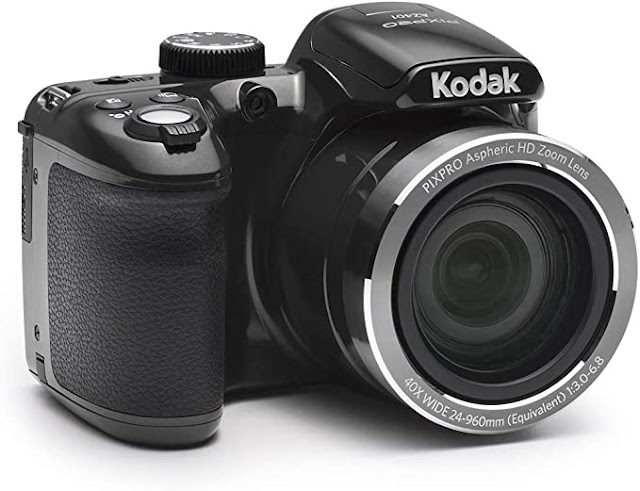
Kodak PIXPRO Astro Zoom

Kodak PIXPRO Astro Zoom AZ401-BK 16MP Digital Camera with 40X Optical Zoom and 3" LCD


This is a fantastic, budget-friendly camera that's easy to learn, easy to use. The new Kodak PIXPRO AZ401 digital camera is part of their Astro zoom collection. 

Comes with a 40x Ultra long zoom lens with optical image stabilization delivers crisp, clear 16 Megapixel close-ups, 180 Degree Panorama or HD videos with the switch of a button. Object tracking, post-editing features and a host of powerful yet intuitive settings make photography with this Camera effortless, entertaining and frustration-free. 


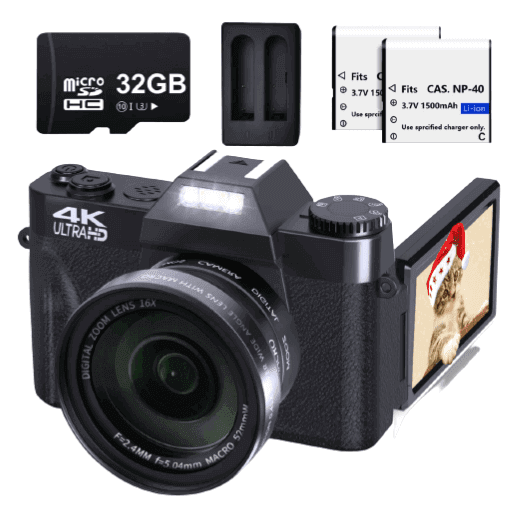
VJIANGER 4K Digital Camera

VJIANGER 4K Digital Camera 48MP Pixel Manual Focus Vlogging Camera


This 4K small digital camera with 5*3*2(IN) size is so lightweight and portable. The camcorder is designed for amateurs, not for professional cameras. Simple and convenient operation makes it an ideal camera gift for beginners, kids, teens, students, elderly to take pictures and shoot, a perfect gift to your family, friends and leaders for festivals, sports events, weddings, parties and important events, a perfect graduation gift for them to record their precious youth.

Features:
  • Video Resolution: 4K_3840X2160 (30FPS)
  • Photo Resolution: 48MP, 30MP, 24MP, 12MP, 8MP, 5MP, 3MP
  • Video/Photo Format:MP4/JPG
  • Display screen: 3.0 inch ultra HD 180 degree flip screen
  • Storage: TF card up to 256GB / Class10
  • Digital zoom: 16x digital zoom
  • Lens: Fixed lens F/3.2,f=7.36mm
  • Battery: Two NP-40 / 1500mAh lithium-ion batteries can work 2- 3H, 2-3H Charging time


Sony Alpha α6000 Mirrorless Interchangeable Lens Camera


You'll love this compact system camera with the world’s fastest autofocus. This Sony Alpha A6000 features a 24.3-megapixel, Exmor APS-C CMOS sensor that makes it easy to shoot scenes in stunning clarity. I like the fact that you can manipulate the display to review your photographs comfortably. I also love Sony lenses because they are probably the best ones on the market for taking good photos in low-light situations without a flash. So if your child takes a lot of indoor photos, consider buying him or her a Sony camera.

It also comes with built-in Wi-Fi that lets you share stored content across devices.


Other Posts You May Enjoy


Friday, December 5, 2014

Target Wish List App Helps Parents Find Gifts

This post is made possible by Target. All thoughts and opinions expressed below are my own.


Every year I have a little piece of paper that stays in my purse. On it is a scribbled list of items that my children want for Christmas. I don't typically buy everything on the list, but I pick and choose the items the want the most or that I think have the most value. This year, though, things got a little easier for me with the Target Wish List app.

This new app is free to download and allows you to create wish lists for up to 10 people. You can even share their lists with family and friends. It is a lot like a Target wedding or baby registry.

Once you've downloaded the app and signed into (or created) your Target.com account you can begin creating profiles for your kids. My kids had fun choosing their own avatar and then exploring "Santa's Workshop." Each room is a different area and items from that section pass by on conveyor belts. You can click on items to select them and add them to your wish list.

The app also works with the Target Holiday Toy Catalog, which you can pick up at your local store. All you have to do is hold your mobile device (phone or tablet) directly over the page and click on the "+" buttons to add specific toys to your wish list. (Psst! If you hold the device over the cover of the catalog there is a fun surprise for you!)

Target Wish List App

Once your child has finished his or her list, s/he can even send it to Santa with the Letter to Santa option! It requires your child to sign their name using their finger and then boosh! Off it goes to the North Pole.

If your family doesn't do Santa, or the kids are too old, then you can just save it and share it with friends.

Parental Guidance for Using the Target Wish List App


Target Wish List App
- Limit your children's list. It would be easy for kids to go through and just click on an outrageous number of items making it hard for parents to pick from. I suggest you give your kids a limit and tell them they are allowed to pick 10 - 20 items for their wish list with the understanding that you may choose only a few of those items for Christmas. I impressed upon my kids that they had better select only their favorite items because otherwise I may choose one they don't like as much because I assumed that they really wanted all of the items listed.

- Don't use their real names. This is especially important if you'll be sharing their list with friends or family. You'll be entering a shipping address, which may or may not be your home address. Maybe it is the overprotective mom in me, but I know there is no guarantee that the list won't end up in a stranger's hands. So I use nicknames or other ID's such as "Monica's Daughter" or "Brad's Son" to identify my kids. If you aren't sharing the lists, but just using them for yourself, use nicknames to identify your kids.

- Share it only via text or email with only close friends or family (ahem...los abuelos!). You'll have the option to share it via twitter (I don't know why you would do that), or Facebook, too. Just be thoughtful in your decision.


Sunday, October 5, 2014

Prep for the Holidays with Appliances from Best Buy

© BlueOrange Studio - Fotolia.com
This is a sponsored post.

It is just so hard for me to believe that the holiday season is upon us! We only have a few weeks until Halloween & Día de los Muertos, followed closely by Thanksgiving, Las Posadas, and Christmas.

This year, one of the books we're using is A Child's Geography by Ann Voskamp. I love the lessons because in addition to teaching the kids about the world we live in, it calls on us to do acts of service for the people we love and those who live nearby. There is a lot of cooking, baking, and more going on over here as we prepare meals for friends and neighbors.

This week we're working on making pan de muerto for the first time ever, too, since I've partnered with our local library to do a class on Día de los Muertos and set up an ofrenda! We shopped all afternoon for supplies. And each year, our homeschool group usually gets together to decorate holiday cookies. It's one of our favorite events of the holiday season. So my kitchen is seeing a lot of action between now and the end of the year.

To prepare for all the activity, I've also been doing a lot of remodeling in my house over the last few months. It's nothing major, mostly taping & bedding, painting, and wallpapering. I'm in the middle of finishing a new pantry my husband built for me in our kitchen. It is SO great to have storage space for food, tools, and the appliances that I don't use everyday! All my cookie cutters (I have a LOT) finally have a place of their own where they wait patiently for December to roll around.

This year, I'm hoping to host the cookie decorating party at our house. My kids have been begging to have everyone over so they can decorate and eat and play and decorate some more. I'm also toying with the idea of hosting a posada at our house one day. I just can't decide if I'm ready to pull that one off, though, as no one here knows anything about it. So it might be a little hard to arrange without practice.

Needless to say, as part of my kitchen upgrade, I'm playing with the idea getting a mixer and a new stove. Best Buy has a Frigidaire FGIF3061NF that has one of those convection ovens that reduces your baking time, and a Whirlpool with a double over (my greatest dream!) so you can cook two dishes at different temperatures at the same time! Can you imagine how much time that would save?? That gives me more time to spend eating decorating cookies. :)

At the same time, though, our local church has been feeding low-income residents once or twice a month. One thing that is really important to me is for our kids to see the needs in our communities and give support when they are able. I'd love for us to be able to cook and contribute food, or even buy an oven for their kitchen - which is horribly outdated and desperately needs improvements made to meet the needs of their program. I want to nurture my children's sense of compassion and doing social good.

If you are looking for ways to streamline your own party hosting, or are ready to upgrade your kitchen before the holidays hit, or even if you are looking to give back to your community by supporting your local non-profits - Best Buy has some great ideas. You can read more about them on their website Holiday Prep page.

Disclosure: I'm a Best Buy Ambassador, which allows me to share with you special deals and information like this. I was compensated for this post, but all opinions, thoughts, and stories are completely my own!

Wednesday, May 21, 2014

PBS KIDS Super Vision App for Parents


I'm VERY big on monitoring what my kids are accessing and playing online or via any digital format. As recommended, they are not allowed to have a TV or computer in their rooms. Instead, our school computer is in our school room where everyone can see what is on the screen.

It's not just their safety and innocence that I'm worried about. I also like to know what they are learning from the various educational sites on which they play games. But that isn't always easy. When my kids are on PBSKids.org, I don't really worry about what they're learning, even if I don't always know what they are learning simply because I know that PBS KIDS has my children's well being in mind and I trust them.

Still, I was pretty pleased to learn that PBS KIDS just launched a new revolutionary app designed specifically for parents that will give them the “super power” to engage with their kids in the digital medium as never before. Parents need all the tools that they can get to help them track their children's progress and keep them safe online.

PBS KIDS Super Vision
 
The new, free app is a first-of-its-kind tool that parents can access conveniently from their mobile phones anytime, anywhere, to see what their kids are watching, playing, and learning on pbskids.org, and help them make the most of their children’s PBS KIDS screen time. (Remember to always limit your child's screen time each day!)

With the PBS KIDS Super Vision App, now available on iPhone and iPod Touch, parents enter a simple code on their mobile device to start receiving:
  • Real-time information on what their child is playing, watching and learning on pbskids.org;
  • The ability to remotely set a Play Timer from their mobile device that will put pbskids.org to sleep on their child’s screen, easing the transition from playing online to another activity, such as dinner time or bed time;
  • Related activities that they can do with their child off-screen to extend the fun and learning goals of the games or videos their child plays on pbskids.org;
  • An Activity Summary to view the top educational skills, shows, videos and games their child used on pbskids.org.
The PBS KIDS Super Vision App will mean peace of mind for parents like us, while our kids build key skills in the safe and educational environment that pbskids.org provides. The app works anytime, anywhere – the connection doesn’t require physical proximity – making it easy for busy parents to check in on their kids’ online activities while they are on the go.

Other Posts You May Enjoy


Saturday, September 14, 2013

Review: The HP Chromebook Plus A Norton Anti-Virus Software Giveaway

HP Pavillion 14 Chromebook

If you are a regular reader of this blog, the chances are pretty good that you know your way around a computer. In fact, chances are that you are a teacher or parent who looks for educational resources online on a fairly frequent basis. Am I right? Actually, I just described myself. I spend a lot of time searching for printables, activities, and other resources online to supplement my children's education. And as you well know by now, I spend a lot of time writing. So I'm very dependent upon my computer and laptops.

Today's review is not of a kid's product, but for a teacher or parent who is looking to invest in a new laptop. Middle and high-school students who write a lot of essays can certainly benefit from this post also. I was asked by Staples to write an honest review the new HP Chromebook. So here ya go!

HP Pavillion 14 Chromebook

The HP Pavillion 14 Chromebook
Retails for $299.99

The new HP Pavillion 14 Chromebook is my first experience with any of the Chromebooks, but it took me all of two minutes to realize that this laptop was built for someone like me since I use a lot of Google products online (gmail, Google docs, Chrome browser, Google Hangouts). It is really designed for use with internet access because all of the software is stored online in the Google Drive. So if you are someone who doesn't have regular access, this might not be the best choice for you. However, you DO have the option of working with many of the offline-enabled web apps, like gmail offline, which I thought was a really neat feature. It stores your responses and automatically syncs/sends them whenever an internet connection is detected. The same is true for Google Docs, Calendar, Scratchpad, photo editing, and more.

HP Pavillion 14 Chromebook screenshot

This laptop has a very simplistic look and feel to it, and the clean desktop with only a few icons at the bottom really make me feel organized (even if it is only an illusion!). The 14-inch, diagonal HD screen is a really nice change from my little notebook, making it much easier for me to see photos and the images/graphics on downloads, lesson plans, and more. Furthermore, the images are sharp and clear. I can also personalize my desktop wallpaper with a breath-taking image. You can find a whole slew of them in your settings area, or upload your own. I'm changing mine on a regular basis just because the pictures are so beautiful and soothing.


When I first started up the laptop, I was presented with a welcome window that allowed me to select my language, keyboard, and internet connection. After that, I was directed to a menu that allowed me to explore and get comfortable with my new Chromebook. It even included a brief, interactive tutorial for using the touchpad.

With the new Chromebook you also get 100 GB of Google Drive free for two years. I really loved seeing that since I use the drive a lot after having lost files on my home PC. And since I haven't been able to afford to buy the new Microsoft Office software, and thus I have so much trouble opening .docx files, not to mention no access to Excel or PowerPoint, I can now use/open all of these with my Google Drive access.


I have to admit that it took me a while to figure out how to take a screen capture. The menu I mentioned above told me how to take one (what combination of keyboard shortcuts), but I couldn't find them at first until I went back and reread the Save and Access Files section in the menu I mentioned above. I was so relieved that this menu remains in your Apps icon under Getting Started for easy reference. I quickly figured out I needed to download (for free!) the Screen Capture (by Google) app. This allowed me to take a lot of the pictures you see in this post.

Now for the down side: For me, the not so good part is that this is really a full-size laptop, so I'm uncomfortable traveling with it. My smaller notebook is better for travel.  I also didn't like how the Getting Started menu isn't available unless you are connected to the internet.

The other thing is that I cannot download any of my old software that I use for creating printables on this laptop. But I do realize that is not the purpose behind this particular model. Do I wish I could sit and design while watching a movie with my family? Sort of. But on the other hand, work-free family time is so important, I guess I am not really complaining. Plus, I could simply use the Google Drive to create the documents instead. But I haven't ventured into that realm...yet! (Baby steps, People!)

Staples has kindly offered for one MommyMaestra reader to win a Norton Anti-Virus Software. To see their full line of laptops and tablets, as well as anti-virus software, visit Staples.com.

To enter to win, simply use the Rafflecopter below.

a Rafflecopter giveaway

Disclosure: Staples provided me with this HP Chromebook and Norton Anti-virus software. All thoughts and opinions expressed are my own. 

Monday, July 15, 2013

SummerLearning: Mayan Mysteries


Today's summer learning resource is totally awesome. We discovered it through Educents on Saturday and my kids and I absolutely LOVE it. Have you already heard about Mayan Mysteries? It is an interactive, online game that teaches kids all about the Maya culture through stories, challenges, and games that take your child on a super fun adventure.


Looters have been stealing ancient Maya artifacts and it's up to you and your team to solve the mystery and stop the thieves. Your child joins Team Q in their quest to find a lost Maya city. Along the way, they'll have to find clues and complete various challenges (more than 300!) to progress. Your child (and maybe you?) will get an in-depth study of the Maya culture. They'll learn about various Maya sites (like Tikal, Cerén, etc.), explore the Maya calendar, and even try their hand at Maya math. They'll discover artifacts and learn about real archaeological techniques, and decode glyphs.


Technically it has been created for kids 11 years old and older in 5th through 9th grades, but my son who is starting 2nd (okay, he's pretty smart) was fascinated and so was my daughter who is starting 4th. I had them read the story, and asked my daughter to help my son with the harder words. But when she left the room, my son discovered the audio button which reads aloud the text. Either way, it is an awesome read and both of them loved the adventurous feel of the game.

You can also find a series of lessons and printables on the Scholastic website. They're easy enough to print up at home or at school. In addition there is an in-game encyclopedia that encourages students to explore topics and retain information ranging from the Maya governmental system to farming practices and Maya beliefs about time.

I simply love this program which teaches everything from geography and culture to social studies, reading comprehension, science, math, and even spatial reasoning. The content is aligned with the Common Core Standards for Language Arts and Mathematics, in addition to the National Council for Social Studies Curriculum Standards. I would think that this would be a really great addition to any classroom curriculum.


This is certainly a high-quality educational game that is well worth the money. But you can play a free demo of the game at the Dig-it Games website to decide for yourself.

Parents can also purchase a single-user subscription of the game for $21.99. BUT the game is now available on iPad, too, and you can get it for $9.99.  I have purchased the iPad app for my kids simply to save me minutes on my Internet plan.

Monday, February 11, 2013

Teacher's Resource: Art Room Aid


"Painting is just another way of keeping a diary." ~Pablo Picasso 

My children are natural artists and enjoy creating, just like all other children do. And while I frequently use art to teach other subjects, we have reached a point where they are ready to take things a step further. It's time, I think, to provide them with a real opportunity to explore the world of art and the famous artists who have so richly contributed to our world.

So I have teamed up with an art teacher and one of the other homeschooling mothers in our community to put together a month-long workshop for all the homeschooled children in our town. Exploring the Master Painters is the name of our project and it will introduce our students to five famous artists in history: Pablo Picasso, Frida Kahlo, Diego Rivera, Vincent van Gogh, and Henri Matisse. At the beginning of each class, the students will learn about the life of the featured painter, discuss the style most commonly associated with that painter, and then create their own art work. They will experiment with tools and techniques to create their own unique art piece based on the painter's style.

But because we are a small community with limited access to art supplies and the funds with which to purchase them, we have decided to use Art Room Aid to help us make our project a reality. This program was created by Blick Art Materials as a resource to help educators easily fund their projects for free. There are no registration fees, and the entire process is simple and user-friendly. People may donate a cash credit that you can then use to purchase the art supplies from their online art store. Or people can just buy a specific item from your wish list and donate it directly to you! The tool works best if you do your part and promote your wish list via your own social media networks. But the great thing is that Art Room Aid has a Tool Kit with ways to customize flyers, letters, and emails that you can use to help you successfully promote your wish list.

I just published our wish list yesterday and shared it on my personal Facebook page. Already several donors have chipped in...we are SO THRILLED!  

At a time when art programs are struggling due to budget cuts, I would imagine that Art Room Aid is a fabulous tool and much needed resource. In fact, the Department of Education released a report last year saying that the percentage of elementary schools without a visual arts class rose 13 to 17 percent over the last decade. I can't help but wonder how many of these are found in low-income neighborhoods?

If you are an educator looking for ways to fund an art project for your students, y
ou can create your own free account here.
Stay tuned tomorrow and find out what 500 artists had to say about inspiration!


Disclosure: This is a sponsored post in collaboration with the Motherhood. All opinions are strictly my own. I only work with campaigns with which I approve or agree and feel are beneficial to my readers.

Friday, September 21, 2012

Using Lifeables to Save Memorable Moments


As a homeschooling mom, I rely heavily on photos and other recordable moments to keep track of my children's progress, as well as to provide our family with memorable moments. I've talked before about how each year I create a "yearbook" for my kids so that they have something to share with their family and homeschool friends, as well as a keepsake of their yearly accomplishments. I think it is important for kids to see a record of their work and the fun they've had in school.

In the past, I've labored through the process of sorting through pictures and uploading them individually to an online software program that lets me resort them and arrange them in an album. But now, there is a new site that is helping me streamline the process.

Lifeables is a new company that is the first service that automates the entire process of capturing, sorting through, organizing, and displaying your family stories. I connected it to my personal FB page and it went through and found photos and status updates related to my kids, then organized them in chronological order in an online album. I have the option of sharing this album with specific people (family) IF I want to. I'm very particular about my kids' privacy, so I like that what I create online is kept secure and no one can see it unless I invite them to do so.

In addition, the company is in the process of creating a shop that will allow you to create personalized gifts, including albums, posters, and even coloring books from your own pictures just to name a few. I think by the end of this school year, I'll play with creating an album/year book for the kids using Lifeables.

You know what I like best? I was able to register for an account for FREE. And so can you.


Disclosure: This post was compensated and in collaboration with Lifeables and Latina Bloggers Connect. All thoughts and opinions, though, are purely mine.

Tuesday, May 8, 2012

Quizlet: For Teachers, Parents, and Students


Quizlet is a free, online flash card maker. The possiblities here are endless. I can see using this to create cards of my kids' latest spelling words, science terms, new vocabulary, foreign language words, math sentences, geography landforms, continents & oceans, countries in South America/Europe/etc., important figures in history, names of the presidents, the 50 states, bones in the body, verbs, sight words...you get the picture. 

It's fast. It's easy. And it's fun. 


If you watched the video above, then I you also know that this is a perfect tool regardless of what language you speak!

Enjoy!

Monday, January 23, 2012

Swag Bucks: An Easy Way to Earn Books for School

Search & Win

I have an intimate love of Amazon.com. I find so many resources there for homeschooling my kids, that whenever I have the opportunity to get a gift card, I take it. And one of my favorite ways to get a gift card is by simply using Swag Bucks.

Swag Bucks is an online search engine, similar to Google. I earn points or "Swag Bucks" just by using it to look up information online. Once I've accrued a large number of swag bucks, I can turn around and redeem them in the Swag Store and get any number of prizes. I, of course, prefer to save up and redeem my bucks for a gift certificate to Amazon, but there are many other stores including Barnes & Noble, Bass Pro, Old Navy, STARBUCKS, JCPenny...the list goes on and on.

So what are you waiting for? Get over there and sign up! (And while you're at it, tell them I sent you so I can get some extra swag bucks!)

Con mucho cariño...

Wednesday, November 30, 2011

Get Rewarded for Doing Good: DailyFeats.com


It's crazy. But I love it! Who would have ever thought you could get rewarded just for doing "good things?" I found out about DailyFeats.com at the Blogalicious conference last October. I didn't understand at first what it was all about. I mean, I was confused. Someone I don't know is going to reward me for doing small, positive acts? Seriously?

I've only just signed up and started figuring out how the system works, but I can see so much potential in this site! Especially as a mom. Which is why I want to feature them today, since this week on MommyMaestra.com is all about teaching our children to do good, to be thoughtful and giving.

The website is simple. You just register, and then every day (or whever you want) you can log in and check off the good things that you did that day. Possible good actions include:

• !earthscience - Learn something about the nature of our planet
• !sendanimalfacts - Share an e-card that teaches about wildlife
• !familydinner - Sit down to dinner with your family
• !museum - Visit a museum!
• !grandparents - Spend time with your (or your kids') grandparent(s)
• !familytree - Research and create your family tree
• !donatefood - Donate to a food bank or food pantry
• !sharehistory - Share an interesting historical story with someone
• !classicalmusic - Listen to a work of classical music
• !holdthedoor - Hold the door open for someone
• !bekind - Treat others with kindness

You get the idea. The list goes on and on and on! I think the thing I like best about this site is that it makes us conscious of our daily actions. It encourages us to do good. I think I'm less excited, really, to get my "rewards" as I am to simply monitor my own behavior. And I am  thinking of creating an account that I can manage for my kids. I think they will simply love being able to click on the "stamps" and push the "I Did It" buttons, which record your good actions.

And if you are not so into redeeming your rewards, you can also choose the option to redeem a "donation reward." DailyFeats partners
with various organizations and non-profits. When you redeem one of the donation rewards, their partner makes a donation to the specified nonprofit. (There are no tax implications for our members -- it's just good karma.) This is a great way to use your points to help contribute to positive change.

So if you are looking for a pretty neat and unusual way to teach your children to be generous and charitable, try out DailyFeats.com. I'd love to know what you think of it.

Con mucho cariño...

Thursday, October 13, 2011

MommyMaestra is Now On Pinterest


It's true. I have finally caved and joined Pinterest. I just felt like there were so many ideas that I was losing because I didn't have a way to keep track of them.

Now I'm obsessed. I knew I would be, which is why I tried to stay away. But I have been finding other people's board SO helpful!

So even though I am new and have just started, if you'd like to take a look, you can find me easily...http://pinterest.com/mommymaestra

If you are on Pinterest, please share your handle in a comment below so that I can follow you!

Con mucho cariño...

Tuesday, October 4, 2011

Recessitate Your Classroom

A few weeks ago, I received a sample of Recessitate, a tool for classrooms. It is a collection of 24 color-coded activity cards in three categories: Calm Down, Gear Up, and Wake Up. The goal of the cards is to help students focus on their work, or to give them a mental break from intense schoolwork.

I wondered how well this product would work for homeschoolers so I decided to try it out on my own kids. All you have to do is pick a card (any card!), then read it and lead your children in the activity. For our first card, I chose this one from the calm down section:


The instructions on the back of the card are:

• Sit down comfortably
• Remember to breathe slowly in and out
• Close your eyes
• Imagine a leaf
• Imagine the twig that holds the leaf
• Imagine the branch that holds the twig
• Imagine the trunk that holds the branch
• Imagine the trunk firmly planted in the ground
• Imagine looking up the trunk to the top of the tree
• Imagine the tree full of branches and full of twigs and full of leaves
• Pause and take a quiet moment to imagine the leaves, twigs, branches and trunk of this beautiful tree
• Open your eyes when ready

I was immediately struck by the idea that basically this was a guided meditation for children. How awesome is that? My kids totally loved the whole experience. (Wow. We get to just sit and imagine?!?) The whole activity lasted just about five minutes, maybe a little less.

And afterwards, they were happy listeners, engaged in our lesson plan.

I don't usually have to 'wake up' or 'gear up' my kids, but I tried the other cards after we've had a particularly difficult math or reading lesson, and they certainly appreciated the break and the opportunity to move. I think it helped to relax and refresh their minds and get them back back into the swing of things. (In fact, I enjoyed it so much, too, that I thought about recording the directions on each card to play back to myself!)

Their website says that Recessitate aims to "engage diverse learners, increase student focus, build rapport, reduce stress, foster self-awareness, and create positive climates for learning." I think this product can do exactly that. I think traditional classrooms especially, could benefit from this tool, as well as homeschooling families.

I've mentioned before that healthy living - including a healthy diet and exercise plan - is essential to successful learning. I appreciate how this product allows children to be aware of their bodies and encourages movement.

If you're interested in learning more about Recessitate, please visit their site.

Con mucho cariño...

Disclosure: I received Recessitate as a review sample. All thoughts and opinions expressed here are my own.

LinkWithin

Related Posts Plugin for WordPress, Blogger...